

Docs Menu
Profiles and Inputs
Prepare baseline demand and interval files for a Project Modelling case.
Enter Baseline demand
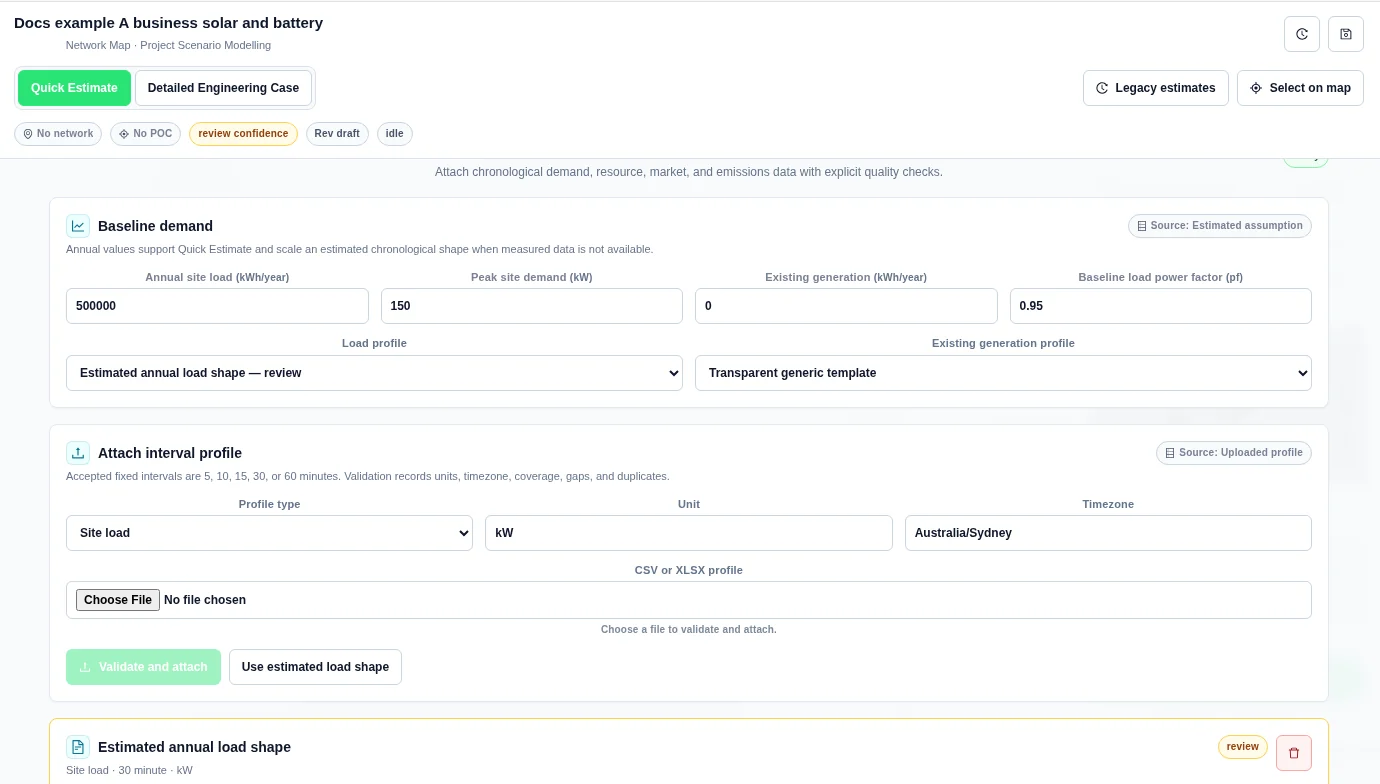
Open Demand & Resource Profiles. These values support Quick Estimate and scale the demand shape used in detailed modelling.
| Field | New-case default | Meaning |
|---|---|---|
| Annual site load | 1,000,000 kWh/year | Annual baseline consumption. A detailed load profile is converted to interval energy and scaled to this annual total when it is positive. |
| Peak site demand | 250 kW | Baseline peak demand assumption. |
| Existing generation | 0 kWh/year | Annual generation already present before the proposed assets. |
| Baseline load power factor | 0.95 pf | Baseline load power factor. The input range is 0.01 to 1. |
| Load profile | Transparent generic template | Choose an attached Site load profile. |
| Existing generation profile | Transparent generic template | Choose an attached Existing generation profile. |
Choose a profile type
Each upload produces one series. Upload separate files for load, generation, resource availability, prices, and emissions.
| Profile type | Initial Unit | Where to use it | Recognized value-header text |
|---|---|---|---|
| Site load | kW | Load profile under Baseline demand. A successful load attachment selects it automatically. | load, demand, kw, value |
| Existing generation | kW | Existing generation profile. A successful generation attachment selects it automatically. | generation, output, kw, value |
| Resource availability | pu | Availability profile on a generation or load-adjustment asset. | availability, factor, percent, value |
| Market / value | Case currency/MWh, for example AUD/MWh | Select the uploaded series in the price profile controls in Value & Finance. | price, tariff, rate, value |
| Emissions intensity | kg CO2-e/kWh | Select the uploaded series in the emissions profile control in Value & Finance. | emission, intensity, factor, value |
Changing Profile type updates the suggested Unit. Review it before upload. Merely attaching a resource, price, or emissions file does not assign it to an asset or value stream.
Upload and attach a file
- Choose Profile type.
- Enter the correct Unit.
- Set Timezone. The new-case default is UTC.
- Choose the file under CSV or XLSX profile.
- Select Validate and attach.
- Read the status and messages on the attached profile card.
- Select that profile in the relevant baseline, asset, or finance control.
The button is disabled until a file is selected and while validation is in progress. Each card shows the file name, type, interval length, unit, source, time zone, and coverage dates. Coverage pending means date coverage is not available. Use the delete button on the profile card to detach it from the case. Review any profile selections before running again.
File structure
- Use CSV or XLSX. The upload limit is 25 MB.
- Put column headings in the first row.
- Tabular parsing is limited to 1,000,000 data rows and 2,000 columns. XLSX contents must also stay within a 250 MB uncompressed limit.
- For XLSX, put the data in the first worksheet. Use stored numeric values and timestamp text.
- For CSV, use UTF-8 text. A UTF-8 byte-order mark is accepted. The parser detects comma, semicolon, tab, or vertical-bar separators.
- Use one timestamp column and one numeric value column for the simplest, least ambiguous file.
- Do not use a thousands separator inside unquoted numeric values. Use a decimal point for fractional values.
- Use fixed intervals of 5, 10, 15, 30, or 60 minutes.
A safe CSV header is timestamp,value. For example, a short load-format example is:
timestamp,value
2025-01-01T00:00:00Z,125.4
2025-01-01T00:30:00Z,118.2
2025-01-01T01:00:00Z,116.0
This example shows the format only. Three rows are not a complete annual profile.
How columns are selected
Header matching ignores case. The first header containing timestamp, datetime, date, or time is the timestamp column. The first other header matching the selected type's value-header text is the value column. A match can be part of a longer header, such as load_kw. If no value header matches, the first non-timestamp column is used.
The workbench does not show a manual column-mapping dialog. Remove unrelated columns or rename the required value column before upload. A file containing both load and generation is not automatically split into two profiles.
Timestamps and time zones
- Use ISO 8601 timestamps, such as
2025-01-01T00:00:00Zor2025-01-01T10:00:00+10:00. - Keep timestamps in strictly increasing row order.
- Use one time convention across all files. UTC avoids repeated local hours during daylight-saving changes.
- Record the source time zone in Timezone. Do not assume that this field converts or repairs the timestamps in the file.
- For XLSX, use ISO timestamp text rather than Excel date serial numbers.
The interval is inferred from the median positive timestamp spacing. If no spacing can be inferred, the upload uses 60 minutes. Without timestamps, date coverage cannot be verified. Supply timestamps for detailed conclusions.
Profiles referenced by the same detailed case must have the same number of intervals and the same interval duration. Align their start time, end time, and row order before upload. Equal row counts alone do not prove that the files describe the same times.
Units and values
| Input | Rule |
|---|---|
| Load | Use kW or MW for interval-average power, or kWh or MWh for energy in each interval. Power is converted using the interval duration. Annual site load can scale the resulting shape. |
| Existing generation | Use a generation shape with the declared unit and confirm the Existing generation annual total. The shape is normalized to this annual total. It represents baseline generation, not new DER. |
| Resource availability | Use normalized pu values from 0 to 1 for a generation asset. Convert percentage source data to pu before upload. This is an availability shape, not a separate installed-capacity field. |
| Market values | Use the case currency per kWh or per MWh. Per-MWh prices are converted to per-kWh rates. Do not mix currencies. |
| Emissions | The default is kg CO2-e/kWh. Common gram, kilogram, and tonne units per kWh or MWh are normalized to kg CO2-e/kWh. |
| Blank or nonnumeric cells | A blank is missing data, not a measured zero. Correct missing or invalid samples before relying on the profile. Do not fill gaps with zero unless zero is the verified measurement. |
The Unit field is text, not a unit-conversion wizard. A unit label does not prove the values are correct. Keep load and availability values physically meaningful. Preserve real signed price observations.
Read validation results
| Status | Meaning | Next action |
|---|---|---|
| valid | The upload checks reported no issue. | Confirm the source, units, date alignment, and intended profile assignment. |
| warning | The file has a quality issue, such as missing intervals or excluded invalid values. | Read each message, repair the source, and attach the corrected file. |
| invalid | Timestamp duplicates, unreadable timestamps, or non-increasing timestamps prevent a valid series. | Correct the file or detach it. An invalid attached profile blocks case execution. |
| review | The data is estimated or needs further review. | Replace estimated data with measured or verified input before making a detailed network conclusion. |
Validation messages and fixes
| Message or issue | What to do |
|---|---|
Profile upload exceeds 25 MB | Reduce file size. Keep only the required series and headings. |
Profile needs a numeric value column | Add a numeric value column and a clear header. |
Profile contains no valid numeric intervals | Replace text, blanks, or non-finite values with valid source measurements. |
Profile interval must be 5, 10, 15, 30, or 60 minutes | Prepare a series at one supported fixed interval. |
rows with invalid values were excluded | Repair those rows. Exclusion does not create a valid replacement measurement. |
expected intervals are missing | Check gaps and annual coverage. |
duplicate timestamps were detected | Resolve duplicate records and daylight-saving ambiguity. |
timestamps could not be parsed | Use ISO 8601 timestamp text consistently. |
timestamps are not in strictly increasing order | Sort the source by time and remove duplicate times. |
| A message comparing interval count with a complete year | Supply a full year for annual conclusions, including the appropriate leap-year coverage. |
| The selected file is empty or cannot be read | Choose the file again. Confirm that it is available to the browser and contains a header and data. |
Coverage checks compare the supplied intervals with a complete normal or leap year. A short valid-format file can still carry an annual-coverage warning. Validation does not fill missing samples or make an estimate into measured data.
Use an estimated load shape
- Enter the annual baseline values.
- Select Use estimated load shape.
- Review the Estimated annual load shape card.
The card records a 30-minute estimated shape in kW and uses the case time zone. It is marked review. The detailed run can also use a generic shape when measured data is absent. Generic resource shapes and DC-coupled storage can require additional review.
Estimated demand example
Reusable library inputs and workbook sheets
Shared input library appears above Baseline demand. It stores typed items and immutable versions. A copied profile is added to the open case, but you must still select it for the intended input and review its coverage.
Library Workbook intake maps and imports each CSV/XLSX sheet separately. This is distinct from the single-profile upload below. See Shared Library for version pins, copy-to-project, rate cards and a tested two-sheet example.
Measured signals and approved snapshots
Tracking imports a CSV signal without changing a model automatically. Review the signal, approve a snapshot, then validate and download its report. See Tracking and Profile Validation for the four-row example and limits.


