

Docs Menu
Hosting Capacity Screening
Test additional distributed energy resource capacity against the voltage and thermal evidence in a selected network model.
Watch the Video: Connection Studies & Hosting Capacity (1:40)
Choose the correct workflow
Hosting Capacity is an Engineering Studies study type. It uses an incremental capacity sweep. Connection Readiness can also return hosting-sweep evidence for a connection request. These studies are separate from Connection Study, which compares fixed alternatives and their commercial results.
Use hosting screening to compare candidate capacity across the tested operating conditions and identify where to focus further engineering work.
Set up a screen
- Open Engineering Studies.
- Choose Hosting Capacity in Study Builder. Its default engine is OpenDSS.
- Open Setup & Run. Under Scope Source, choose Map Scope or Selected Assets.
- Check the electrical topology, ratings, voltage base, demand, and point of connection.
- Review Engineering Assumptions.
- Set the capacity step and upper bound.
- Select Check Readiness. Resolve required model inputs, then select Run Study.
- Open Study Results. Inspect the returned method, summary, sweep table, chart, and result layer.
Professional or Enterprise access is required for engineering workbenches. Hosting Capacity does not support Circuit Revision input in this workbench. See Running Engineering Studies for map selection, run controls, readiness, history, and shared outputs.
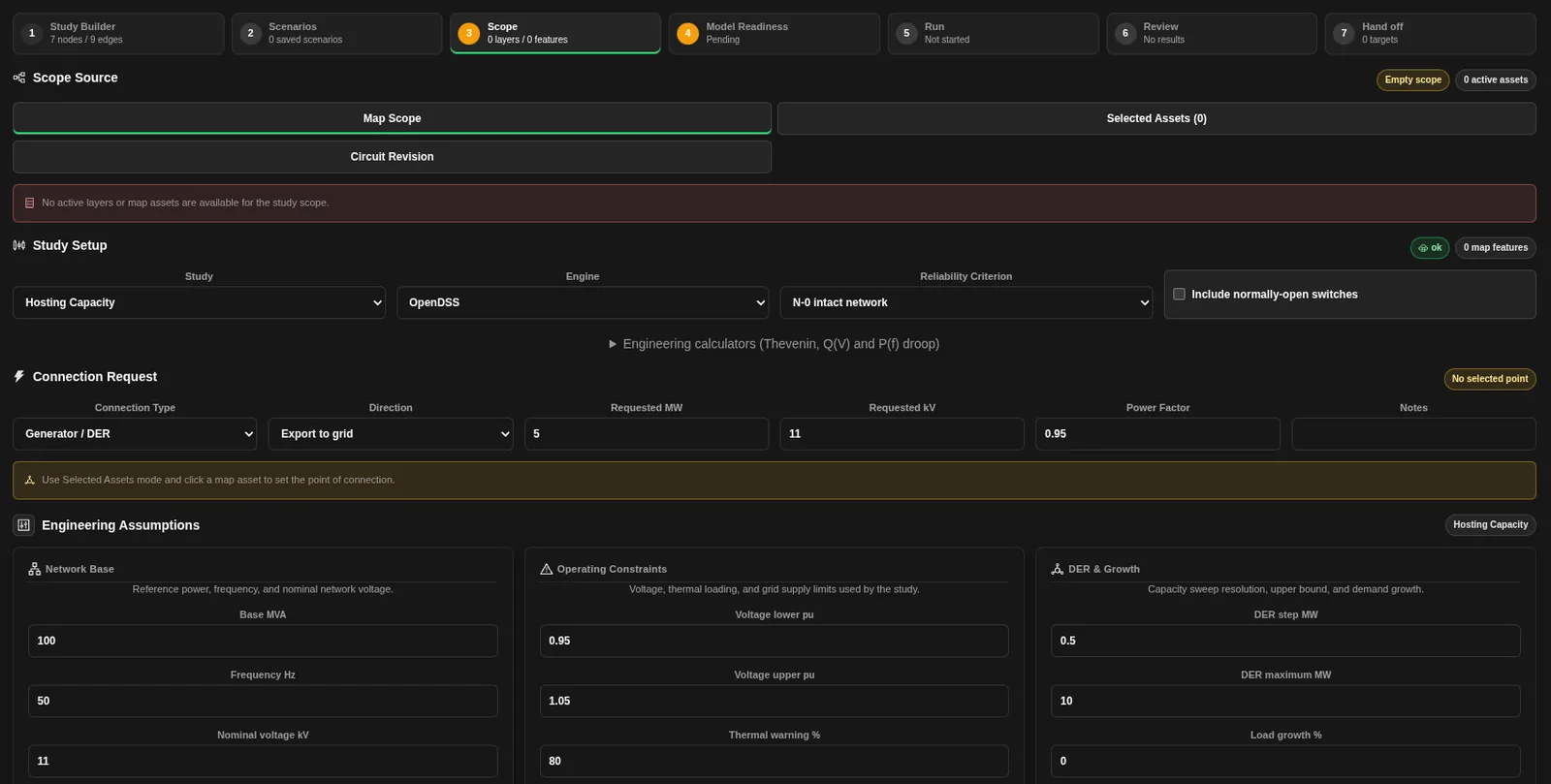
Engineering assumptions
Set these form values using the source ratings and assumptions for the selected network.
| Field | Initial value | Use |
|---|---|---|
| Base MVA | 100 MVA | Reference power base. |
| Frequency Hz | 50 Hz | Network frequency. Change it where the network uses a different frequency. |
| Nominal voltage kV | 11 kV | Nominal network voltage. |
| Voltage lower pu | 0.95 pu | Lower voltage bound. |
| Voltage upper pu | 1.05 pu | Upper voltage bound. |
| Thermal warning % | 80% | General engineering warning threshold. |
| Thermal limit % | 100% | General engineering thermal-limit assumption. Confirm the method-specific check in the result. |
| Grid supply limit MW | 25 MW | Shared network supply assumption. |
| DER step MW | 0.5 MW | Positive increment between tested capacities. |
| DER maximum MW | 10 MW | Requested upper capacity for the sweep. |
| Load growth % | 0% | Shared demand-growth assumption. |
The sweep begins at zero and advances by the configured step. It contains at most 101 tested points. If the step is very small relative to the maximum, the last tested point can be below the requested maximum. Check Step MW in the table rather than assuming the whole requested range was tested.
The candidate is placed at the model's connection bus where available, otherwise at its source bus. Confirm that the returned model and candidate location represent the intended connection. An incorrect location can make the result irrelevant to the proposed site.
Distinguish the returned methods
| Method | What it does | How to use the result |
|---|---|---|
opendss_step_solve | Adds candidate capacity in steps and solves each operating point. It returns convergence, voltage, and line-loading evidence for each tested point. Review that evidence against the applicable network ratings and criteria. | Hosting MW is the highest passing tested capacity. It is limited by the tested resolution and range. |
radial_downstream_screen | Estimates thermal headroom and voltage rise along the relevant path. This can be returned when the solver sweep is unavailable. | Hosting MW is a screening estimate from the limiting thermal and voltage estimates, not a completed electrical solver result. |
Read the summary and sweep table
| Output | Meaning |
|---|---|
| Method | Returned sweep or screening method. |
| Hosting MW | Hosting value for that method and model. Check the method and available evidence. |
| Binding | Reported limiting condition. If no condition is reported, inspect the full table; do not infer unlimited capacity. |
| Pass Steps | Number of tested points marked as passing. This can include the zero-capacity point. |
| Step MW | Additional candidate capacity at each tested point. |
| Status | Pass or blocked for that point. |
| Binding Constraint | Thermal, voltage, combined thermal and voltage, solver, topology, or no reported constraint, as applicable. |
| Minimum Headroom MW | Smallest reported remaining thermal headroom for the test. |
| Min Voltage pu, Max Voltage pu, and Max Loading % | Solved voltage and loading columns for an OpenDSS sweep. |
| Estimated Voltage Rise pu | Estimated rise column for a radial screen. It is not a solved absolute voltage. |
| Notes | Point-specific explanation, including solver or topology limitations. |
The table is named Incremental DER Hosting Sweep. Read its notes when a point is blocked. A screen with no connected in-service branches cannot assess the intended path.
Statuses and next actions
- pass means the assessed checks were within the method's limits at that point. Confirm that all required evidence was available.
- blocked means the point exceeded an assessed limit or could not be assessed successfully. Resolve the binding constraint or missing model evidence.
- ready in the hosting summary means the method returned positive modelled hosting headroom.
- Missing values are not available, not zero. Supply missing ratings, limits, connectivity, or solver evidence before relying on the screen.
If every tested point passes, the study has not necessarily found the limiting capacity. It has only tested the returned range. If the first positive step is blocked, use a justified finer step or improve the model before drawing conclusions.
Charts, map layers, and follow-on studies
Hosting Sweep Headroom plots the tested capacities. A solver sweep includes remaining headroom, minimum voltage, and maximum loading. A radial screen includes remaining headroom and estimated voltage rise. These series have different units; read the series names and table units before comparing their magnitudes.
The hosting-capacity result layer shows branch-level evidence from the returned method. Use the shared engineering result controls to inspect layers, charts, tables, and exports. Keep the source model and method with any exported result.
Use Connection Study to compare fixed alternatives and targeted works. Use additional engineering studies for operating cases, contingencies, and other checks required for the proposed connection. Include outage scenarios and unserved-energy checks when assessing reliability.
Related Guides
- Engineering Studies
- Running Engineering Studies
- Grid Circuit Builder
- Connection Study and System Feasibility
- Connection Study Alternatives and Recommendations
- Engineering Exports and Handoffs


