

Docs Menu
Connection Study Alternatives and Recommendations
Compare fixed connection designs under shared operating conditions and separate engineering eligibility from financial ranking.
Build and select alternatives
Complete the shared inputs described in Connection Study and System Feasibility first.
- Select Alternative to add a design. A study can contain up to eight alternatives.
- Select its card in the strip to edit it.
- Enter Alternative name and Description.
- Use Include on each technology to include it in the design.
- Use Duplicate to copy the active design for a controlled comparison.
- Use Remove to remove an unwanted alternative. Keep at least one alternative.
- Use Add to comparison to pin up to four alternatives. Use Remove from comparison to unpin one.
The active alternative is the design you are editing. The pinned alternatives are the designs selected for comparison. These are separate choices. Selecting Reference returns to the shared reference profiles.
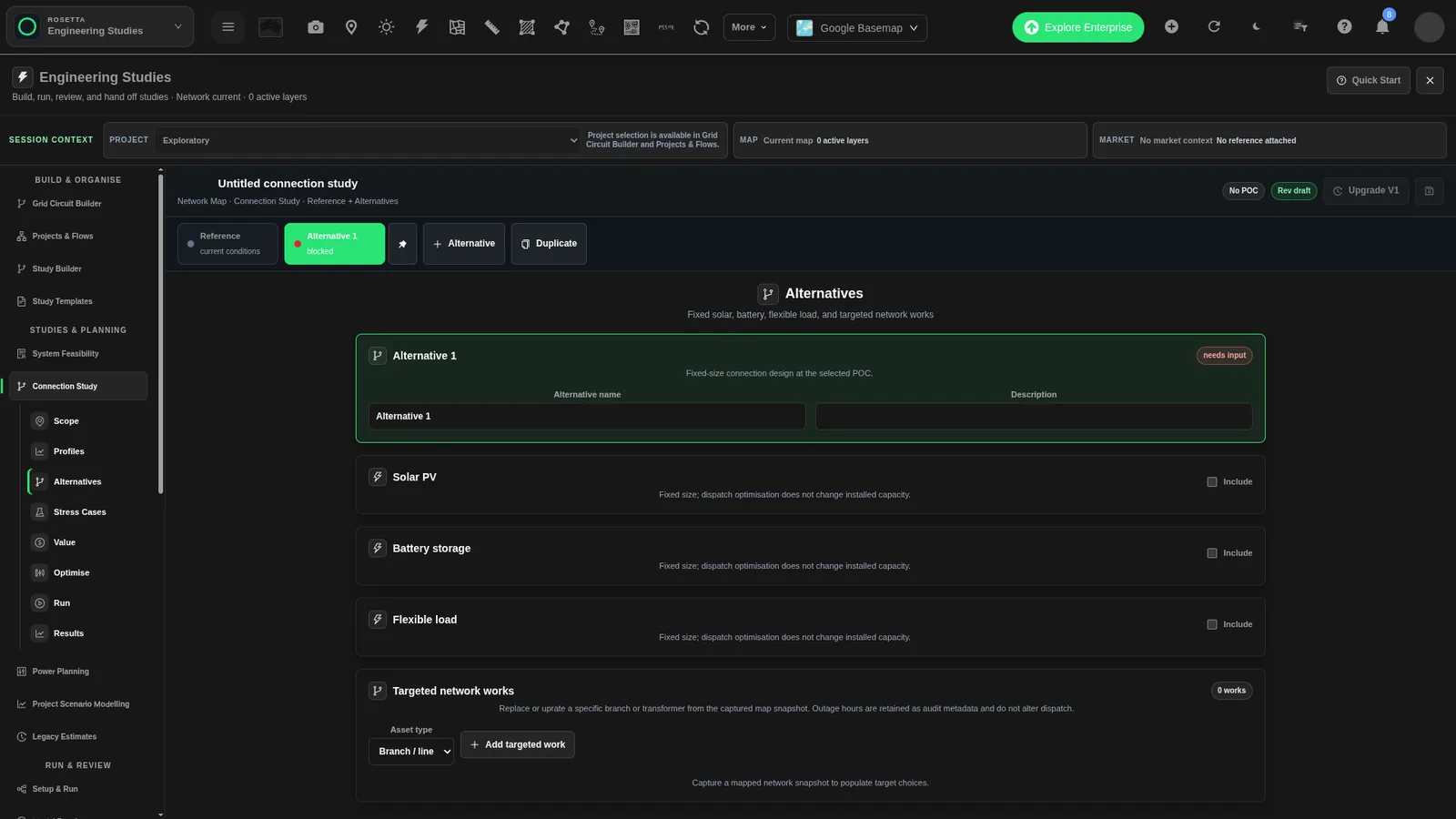
Technology inputs
Technologies start excluded. Set each included technology’s size using the initial form values below as a starting point. Dispatch optimization keeps installed capacity fixed.
| Technology | Inputs and initial values | Checks |
|---|---|---|
| Solar PV | Availability profile: select a valid normalized 0–1 profile. Solar capacity: 500 kW. Solar power factor: 0.95. | Capacity must be positive. Supply the availability profile. Check the signed power factor against the intended operating convention. |
| Battery storage | Battery power: 250 kW. Battery energy: 500 kWh. Minimum SOC: 10%. Maximum SOC: 90%. | Power and energy must be positive. Minimum state of charge must be below maximum state of charge. |
| Flexible load | Flexible load power: 100 kW. Flexible annual energy: 100,000 kWh. | Enter the controllable demand, not the full site demand unless the full demand is controllable. Power must be positive. |
Costs, lifecycle, and replacements
Each included technology has its own capital cost and annual operating cost. For example, use Solar PV capex in the study currency and Solar PV annual opex in currency/year. The battery and flexible-load cards have equivalent fields. Enter supported cost estimates; a zero is a zero-cost assumption, not an unavailable quote.
| Field | How to use it |
|---|---|
| Technology commissioning year | Enter the calendar year when the asset enters service. This is initially blank. |
| Technology retirement year | Enter the retirement year if applicable. It must follow commissioning. This is initially blank. |
| Technology degradation | Annual degradation in %/year. Initial values are 0.5 for solar, 2 for battery storage, and 0 for flexible load. |
| Replacement years | Enter comma-separated years for replacement events. No events are entered initially. |
| Technology replacement cost | Replacement cost as a percentage of capital cost. The initial value is 0%. Set a cost if the replacement is not free. |
The full field label includes the technology name, such as Battery storage commissioning year or Flexible load replacement cost.
Targeted network works
- Capture a network snapshot in Scope.
- In Targeted network works, choose Asset type: Branch / line or Transformer.
- Select Add targeted work.
- Choose the exact Target from the snapshot.
- Set Work type to Resize / uprate or Replace. A new work item starts as Replace.
- Set New rating in MVA. The initial value is 10 MVA; replace it with the proposed positive rating.
- Set In-service year and Upgrade capex. The year is initially blank and capital cost is initially zero.
- Enter Planned outage (record only) in hours if relevant. The initial value is zero.
- Remove unwanted work items with their remove controls.
Apply operating stress cases
Stress Cases applies the same conditions to the reference and all selected alternatives. The central case is mandatory. Add up to five additional deterministic cases, for six cases in total.
- Select Add stress case.
- Give the case a descriptive Name.
- Set the case's load multiplier and generation multiplier. Both start at 1.
- Keep both multipliers positive. A multiplier above 1 increases the corresponding series; a multiplier below 1 reduces it.
- Use Enabled to include or exclude a non-central case.
- Remove a non-central case with its remove control if it is no longer required.
The visible multiplier labels include the case number, such as Stress case 2 load multiplier and Stress case 2 generation multiplier. The central case can be renamed, but cannot be disabled or removed. These cases are deterministic operating tests, not probabilities or a random-outage model.
Screen first, then validate finalists
| Validation mode | Use | Next action |
|---|---|---|
| Screen — broad comparison | Compare designs and identify constraints with a broad screen. | Resolve input issues and select designs for finalist validation. |
| Finalists — recommendation eligible | Request the checks required for recommendation eligibility. | Inspect every stress result and the finalist gate to review recommendation eligibility. |
Engineering and result status
| Status | Meaning | Next action |
|---|---|---|
| pass | The assessed engineering checks passed for the result and conditions tested. | Check finalist validation and reliability evidence before recommending it. |
| review | Evidence or network validation is incomplete, or further engineering review is needed. | Complete the electrical model or missing evidence and rerun the required validation. |
| constrained | A modelled limit remains exceeded, or the dispatch includes material unserved energy. | Change the design, limits where justified, operating assumptions, or targeted works. Rerun all relevant cases. |
| failed | A required calculation or validation did not complete successfully. | Read the diagnostic, correct its cause, and rerun. |
| stale | Inputs have changed since the displayed calculation. | Rerun before using the result or exporting a current comparison. |
The overall engineering status reflects the least favorable stress-case status. A high NPV does not override an engineering constraint.
Reliability and unserved energy
Unserved energy is modelled demand that the dispatch cannot supply, measured in kWh. It is not the same as network headroom. The value covers the evaluated dispatch cases. Assess outage frequency, duration and resilience using the relevant outage scenarios and supporting data.
Recommendation eligibility uses engineering passes and completed finalist validation across the evaluated stress cases. It also checks total modelled unserved energy across those cases against a numerical tolerance. Before relying on the recommendation, confirm that every case has an unserved-energy result. Missing reliability values are not evidence of zero unserved energy.
Recommendation order
- Check whether an alternative is eligible for recommendation.
- Check its engineering status.
- Compare the lowest NPV across its evaluated stress cases.
- Use central-case NPV to distinguish otherwise equivalent alternatives.
The ranking places eligible engineering results ahead of commercial value. Among comparable eligible results, higher worst-case NPV is preferred, then higher central NPV. If no alternative is eligible, do not infer a recommendation from the highest displayed NPV.
Read the comparison
Reference-relative comparison shows the reference beside the pinned alternatives.
| Metric | Interpretation |
|---|---|
| Engineering gate | Engineering status, not financial merit. |
| Finalist gate | Whether the result is eligible for recommendation. |
| Central NPV | Net present value for the central operating case in the selected currency. |
| Worst-case NPV | Lowest applicant NPV among the evaluated stress cases. This is not a statistical confidence bound. |
| Stress cases | Number of returned stress results. |
| IRR | Internal rate of return as a percentage, when available. |
| Payback | Payback in years from the returned financial result. Connection Study supplies discounted payback; do not confuse it with System Feasibility simple payback. |
| Annual energy | Generation energy for the first modelled year reported by the result, in kWh. |
| Import and Export | Grid import and export energy for the first modelled year, in kWh. |
| Headroom | Reported modelled connection headroom in kW. |
| Carbon reduction | Reported emissions reduction in tonnes using the configured emissions and reference assumptions. |
Missing values are not available, not zero. Read the result evidence before comparing alternatives with incomplete metrics. Each alternative card repeats its central and worst-case NPV, finalist gate, and engineering status.
Inspect and export results
- Select Plot Studio to inspect charts and tables from the selected alternatives. Their names identify the alternative. Stress-case selected-perspective NPV is a bar chart by stress case. Stress-case engineering and value results lists Stress case, Selected-perspective NPV, Unserved energy kWh, Engineering status, and Finalist validated. Use this table to check the engineering and reliability evidence for every case.
- Select Show on map where result layers are available. This loads the alternative's engineering layers and fits the map to them. It replaces the current engineering result layers.
- Select Export presentation to package a current reference result with up to four current comparison alternatives. Complete current results are required.
Changing a design makes that alternative's result stale. Changing shared assumptions makes the reference and affected comparison results stale. Rerun the relevant results after editing. See Engineering Exports and Handoffs for presentation controls.
Related Guides
- Connection Study and System Feasibility
- System Feasibility and Planning Studies
- Project Modelling value and finance
- Running Engineering Studies
- Engineering Exports and Handoffs


